
[php] 안드로이드 웹뷰 정리 2026-03-21Webサイト
페이지 정보

본문


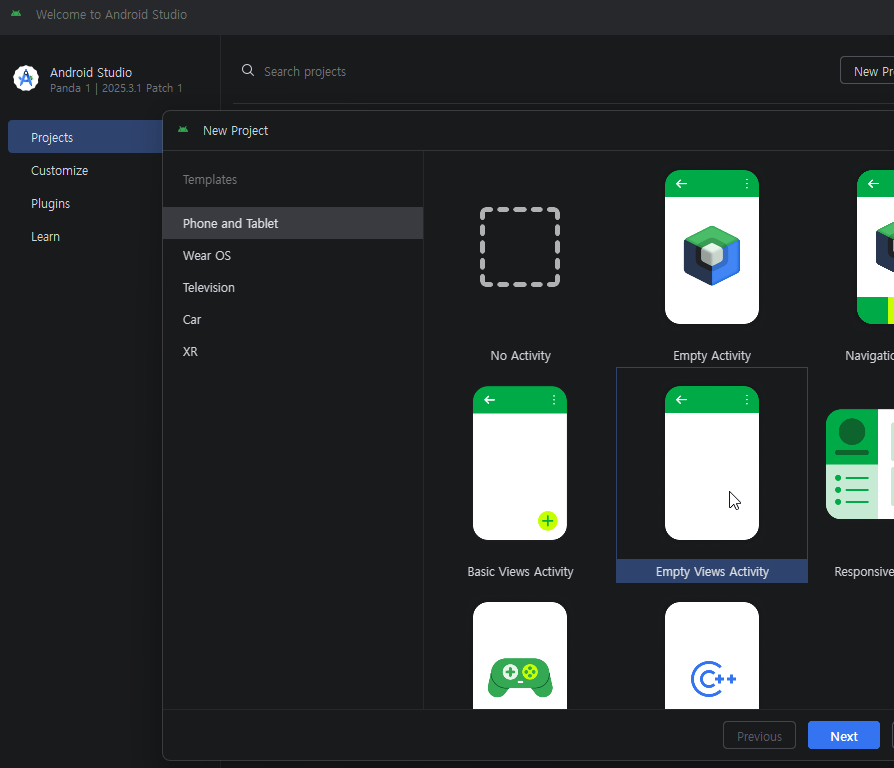
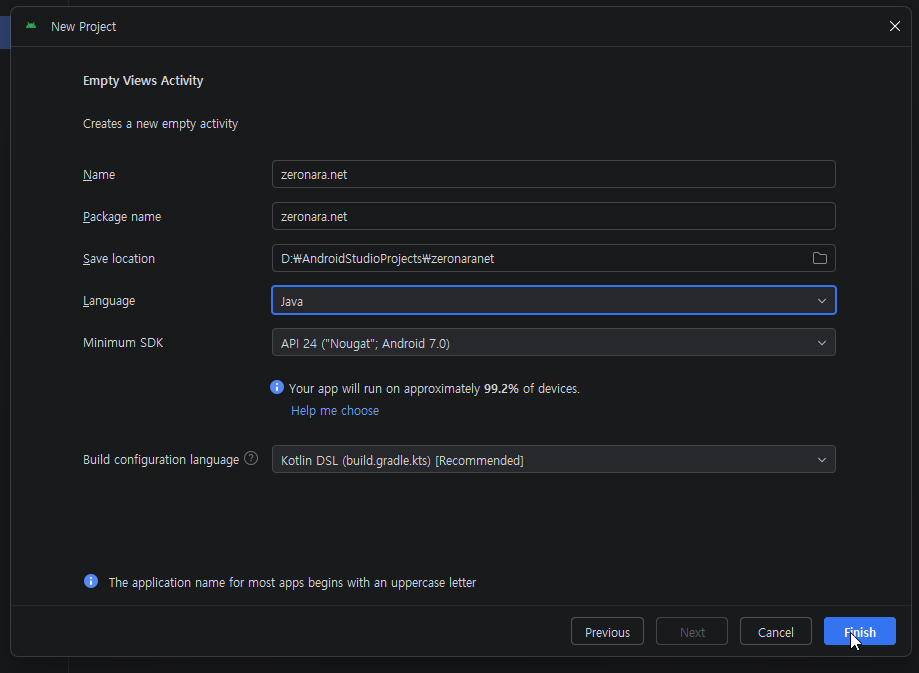
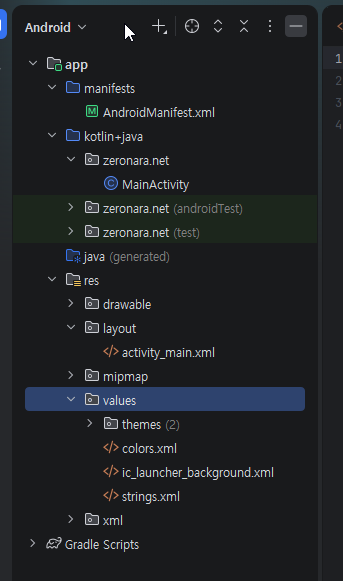
manifests/AndroidManifest.xml
<?xml version="1.0" encoding="utf-8"?>
<manifest xmlns:android="http://schemas.android.com/apk/res/android"
    package="zeronara.net">

    <uses-permission android:name="android.permission.INTERNET" />

    <application
        android:allowBackup="true"
        android:icon="@mipmap/ic_launcher"
        android:label="@string/app_name"
        android:roundIcon="@mipmap/ic_launcher_round"
        android:supportsRtl="true"
        android:theme="@style/Theme.App.Transparent"
        android:usesCleartextTraffic="true">

        <activity
            android:name=".MainActivity"
            android:exported="true"
            android:windowSoftInputMode="adjustResize">
            <intent-filter>
                <action android:name="android.intent.action.MAIN" />
                <category android:name="android.intent.category.LAUNCHER" />
            </intent-filter>
        </activity>

    </application>

</manifest>
kotlin+java/zeronara.net/MainActivity.java
package zeronara.net;

import android.app.AlertDialog;
import android.annotation.SuppressLint;
import android.content.ActivityNotFoundException;
import android.content.Intent;
import android.graphics.Color;
import android.net.Uri;
import android.os.Bundle;
import android.util.Log;
import android.view.Window;
import android.widget.FrameLayout;
import android.webkit.SslErrorHandler;
import android.webkit.WebChromeClient;
import android.webkit.WebResourceError;
import android.webkit.WebResourceRequest;
import android.webkit.WebSettings;
import android.webkit.WebView;
import android.webkit.WebViewClient;
import android.net.http.SslError;

import androidx.activity.EdgeToEdge;
import androidx.appcompat.app.AppCompatActivity;
import androidx.activity.OnBackPressedCallback;
import androidx.core.graphics.Insets;
import androidx.core.view.ViewCompat;
import androidx.core.view.WindowInsetsCompat;
import androidx.core.view.WindowInsetsControllerCompat;
import androidx.swiperefreshlayout.widget.SwipeRefreshLayout;

public class MainActivity extends AppCompatActivity {
    private static final String TAG = "MainActivity";
    public WebView webView;
    private SwipeRefreshLayout swipeRefresh;

    @Override
    @SuppressLint("SetJavaScriptEnabled")
    protected void onCreate(Bundle savedInstanceState) {
        // EdgeToEdge: システムバー領域までコンテンツを拡張(API 36対応)
        EdgeToEdge.enable(this);

        super.onCreate(savedInstanceState);
        requestWindowFeature(Window.FEATURE_NO_TITLE);
        setContentView(R.layout.activity_main);

        // ウィンドウ背景を透明に設定
        getWindow().setBackgroundDrawable(null);

        // ステータスバー / ナビゲーションバーを完全透明に設定
        getWindow().setStatusBarColor(Color.TRANSPARENT);
        getWindow().setNavigationBarColor(Color.TRANSPARENT);

        // システムバーアイコンの色を設定
        // false = 白いアイコン(暗い背景用) / true = 黒いアイコン(明るい背景用)
        WindowInsetsControllerCompat insetsController =
                new WindowInsetsControllerCompat(getWindow(), getWindow().getDecorView());
        insetsController.setAppearanceLightStatusBars(false);
        insetsController.setAppearanceLightNavigationBars(false);

        webView = findViewById(R.id.webView);
        swipeRefresh = findViewById(R.id.swipeRefresh);

        // WebViewの背景を透明に設定
        webView.setBackgroundColor(Color.TRANSPARENT);

        // SwipeRefreshLayout インジケーターの色設定
        swipeRefresh.setColorSchemeColors(
                Color.parseColor("#4A90E2"),
                Color.parseColor("#50C878"),
                Color.parseColor("#FF6B6B")
        );
        // インジケーターの背景色(透明背景に合わせて白)
        swipeRefresh.setProgressBackgroundColorSchemeColor(Color.WHITE);

        // 下にスワイプしたときにページを再読み込み
        swipeRefresh.setOnRefreshListener(() -> webView.reload());

        // WebViewではなくコンテナ(FrameLayout)にパディングを適用
        // → WebViewのスクロール領域はそのままで、システムバー分のマージンを確保
        FrameLayout container = findViewById(R.id.container);
        ViewCompat.setOnApplyWindowInsetsListener(container, (v, insets) -> {
            Insets systemBars = insets.getInsets(WindowInsetsCompat.Type.systemBars());
            v.setPadding(
                    systemBars.left,   // 左(横向きモード対応)
                    systemBars.top,    // ステータスバーの高さ
                    systemBars.right,  // 右(横向きモード対応)
                    systemBars.bottom  // ナビゲーションバーの高さ
            );
            return WindowInsetsCompat.CONSUMED;
        });

        WebSettings webSettings = webView.getSettings();

        // JavaScriptはWebサイトの正常動作に必須
        // 信頼できる自社ドメインのコンテンツのみを読み込むため、XSSリスクは最小限
        webSettings.setJavaScriptEnabled(true);
        webSettings.setDomStorageEnabled(true);
        webSettings.setUseWideViewPort(true);
        webSettings.setLoadWithOverviewMode(true);
        webSettings.setCacheMode(WebSettings.LOAD_DEFAULT);

        // ユーザーエージェント設定
        String defaultUA = webSettings.getUserAgentString();
        webSettings.setUserAgentString(defaultUA + " webviewApp/1.0 (Android)");

        webView.setWebViewClient(new WebViewClient() {

            @Override
            public boolean shouldOverrideUrlLoading(WebView view, WebResourceRequest request) {
                String url = request.getUrl().toString();

                // Google Playストアリンクの処理
                if (url.startsWith("market://") || url.contains("play.google.com/store")) {
                    try {
                        Intent intent = new Intent(Intent.ACTION_VIEW, Uri.parse(url));
                        startActivity(intent);
                    } catch (ActivityNotFoundException e) {
                        // Playストアアプリが存在しない場合はブラウザへフォールバック
                        String fallbackUrl = url.replace("market://", "https://play.google.com/store/apps/");
                        startActivity(new Intent(Intent.ACTION_VIEW, Uri.parse(fallbackUrl)));
                    }
                    return true;
                }

                // 外部ブラウザで開くべきスキームの処理(tel、mailtoなど)
                if (url.startsWith("tel:") || url.startsWith("mailto:") || url.startsWith("intent:")) {
                    try {
                        startActivity(new Intent(Intent.ACTION_VIEW, Uri.parse(url)));
                    } catch (ActivityNotFoundException e) {
                        Log.e(TAG, "指定されたURLに対応するアクティビティが見つかりません: " + url, e);
                    }
                    return true;
                }

                return false; // その他のURLはWebViewで処理
            }

            @Override
            public void onPageFinished(WebView view, String url) {
                super.onPageFinished(view, url);
                // ページ読み込み完了時にインジケーターを非表示
                swipeRefresh.setRefreshing(false);
            }

            @Override
            public void onReceivedError(WebView view, WebResourceRequest request, WebResourceError error) {
                super.onReceivedError(view, request, error);
                // エラー時もインジケーターを非表示
                swipeRefresh.setRefreshing(false);
            }

            @Override
            public void onReceivedSslError(WebView view, SslErrorHandler handler, SslError error) {
                // 【セキュリティ修正】すべてのSSLエラーを無視する handler.proceed() を削除
                // SSL証明書エラー時は接続をブロックし、ユーザーに通知する
                handler.cancel();
                swipeRefresh.setRefreshing(false);

                String errorMessage;
                switch (error.getPrimaryError()) {
                    case SslError.SSL_EXPIRED:
                        errorMessage = "セキュリティ証明書の有効期限が切れています。";
                        break;
                    case SslError.SSL_IDMISMATCH:
                        errorMessage = "セキュリティ証明書のドメインが一致しません。";
                        break;
                    case SslError.SSL_NOTYETVALID:
                        errorMessage = "セキュリティ証明書はまだ有効ではありません。";
                        break;
                    case SslError.SSL_UNTRUSTED:
                        errorMessage = "信頼できないセキュリティ証明書です。";
                        break;
                    default:
                        errorMessage = "不明なSSL証明書エラーが発生しました。";
                        break;
                }

                new AlertDialog.Builder(MainActivity.this)
                        .setTitle("セキュリティ警告")
                        .setMessage(errorMessage + "\n\nこのページは安全ではないため、接続がブロックされました。")
                        .setPositiveButton("確認", (dialog, which) -> dialog.dismiss())
                        .setCancelable(false)
                        .show();
            }
        });

        webView.setWebChromeClient(new WebChromeClient() {
            @Override
            public void onReceivedTitle(WebView view, String title) {
                super.onReceivedTitle(view, title);
            }
        });

        // OnBackPressedDispatcherを使用した戻るボタンの処理
        OnBackPressedCallback callback = new OnBackPressedCallback(true) {
            @Override
            public void handleOnBackPressed() {
                if (webView.canGoBack()) {
                    // WebViewの履歴を一つ戻る
                    webView.goBack();
                } else {
                    // 履歴がない場合はシステムの戻る動作に委譲
                    setEnabled(false);
                    getOnBackPressedDispatcher().onBackPressed();
                    setEnabled(true);
                }
            }
        };
        getOnBackPressedDispatcher().addCallback(this, callback);

        // アプリ起動時にWebサイトを読み込む
        webView.loadUrl("https://zeronara.net");
    }

    @Override
    protected void onPause() {
        super.onPause();
        webView.onPause(); // WebViewの描画を一時停止
    }

    @Override
    protected void onResume() {
        super.onResume();
        webView.onResume(); // WebViewの描画を再開
    }

    @Override
    protected void onDestroy() {
        super.onDestroy();
        webView.destroy(); // WebViewリソースを解放
    }
}
res/layout/activity_main.xml
<?xml version="1.0" encoding="utf-8"?>
<FrameLayout
    xmlns:android="http://schemas.android.com/apk/res/android"
    android:id="@+id/container"
    android:layout_width="match_parent"
    android:layout_height="match_parent"
    android:fitsSystemWindows="false">

    <androidx.swiperefreshlayout.widget.SwipeRefreshLayout
        android:id="@+id/swipeRefresh"
        android:layout_width="match_parent"
        android:layout_height="match_parent">

        <WebView
            android:id="@+id/webView"
            android:layout_width="match_parent"
            android:layout_height="match_parent"
            android:fitsSystemWindows="false" />

    </androidx.swiperefreshlayout.widget.SwipeRefreshLayout>

</FrameLayout>
app/Gradle Scripts/build.radle.kts (Module :app)
plugins {
    alias(libs.plugins.android.application)
}

android {
    namespace = "zeronara.net"
    compileSdk {
        version = release(36) {
            minorApiLevel = 1
        }
    }

    defaultConfig {
        applicationId = "zeronara.net"
        minSdk = 24
        targetSdk = 36
        versionCode = 2026032102
        versionName = "2.0"

        testInstrumentationRunner = "androidx.test.runner.AndroidJUnitRunner"
    }

    buildTypes {
        release {
            isMinifyEnabled = false
            proguardFiles(
                getDefaultProguardFile("proguard-android-optimize.txt"),
                "proguard-rules.pro"
            )
        }
    }
    compileOptions {
        sourceCompatibility = JavaVersion.VERSION_11
        targetCompatibility = JavaVersion.VERSION_11
    }
}

dependencies {
    implementation(libs.appcompat)
    implementation(libs.material)
    implementation(libs.activity)
    implementation(libs.constraintlayout)
    implementation(libs.swiperefreshlayout)
    testImplementation(libs.junit)
    androidTestImplementation(libs.ext.junit)
    androidTestImplementation(libs.espresso.core)
}
gradle/libs.versions.toml
[versions]
agp = "9.1.0"
junit = "4.13.2"
junitVersion = "1.3.0"
espressoCore = "3.7.0"
appcompat = "1.7.1"
material = "1.13.0"
activity = "1.13.0"
constraintlayout = "2.2.1"
swiperefreshlayout = "1.2.0"

[libraries]
junit = { group = "junit", name = "junit", version.ref = "junit" }
ext-junit = { group = "androidx.test.ext", name = "junit", version.ref = "junitVersion" }
espresso-core = { group = "androidx.test.espresso", name = "espresso-core", version.ref = "espressoCore" }
appcompat = { group = "androidx.appcompat", name = "appcompat", version.ref = "appcompat" }
material = { group = "com.google.android.material", name = "material", version.ref = "material" }
activity = { group = "androidx.activity", name = "activity", version.ref = "activity" }
constraintlayout = { group = "androidx.constraintlayout", name = "constraintlayout", version.ref = "constraintlayout" }
swiperefreshlayout = { group = "androidx.swiperefreshlayout", name = "swiperefreshlayout", version.ref = "swiperefreshlayout" }

[plugins]
android-application = { id = "com.android.application", version.ref = "agp" }
res/values/themes.xml
<?xml version="1.0" encoding="utf-8"?>
<resources>

    <!-- 透明背景 + Edge-to-Edge テーマ -->
    <style name="Theme.App.Transparent" parent="Theme.AppCompat.NoActionBar">
        <!-- ウィンドウ背景を透明に設定 -->
        <item name="android:windowBackground">@android:color/transparent</item>
        <item name="android:colorBackground">@android:color/transparent</item>

        <!-- ステータスバー / ナビゲーションバーを完全透明に設定 -->
        <item name="android:statusBarColor">@android:color/transparent</item>
        <item name="android:navigationBarColor">@android:color/transparent</item>

        <!-- システムバーの背景をアプリ側で描画 -->
        <item name="android:windowDrawsSystemBarBackgrounds">true</item>

        <!-- 半透明モードを無効化(完全透明のため) -->
        <item name="android:windowTranslucentStatus">false</item>
        <item name="android:windowTranslucentNavigation">false</item>

        <!-- ノッチ / パンチホール領域までコンテンツを拡張 (API 28+) -->
        <item name="android:windowLayoutInDisplayCutoutMode">shortEdges</item>

        <!-- ソフトキーボード表示時のレイアウト調整 -->
        <item name="android:windowSoftInputMode">adjustResize</item>
    </style>

</resources>
res/values/strings.xml
<resources>
    <string name="app_name">ZERONARA</string>
</resources>
아이콘 생성
***.png준비 640*640
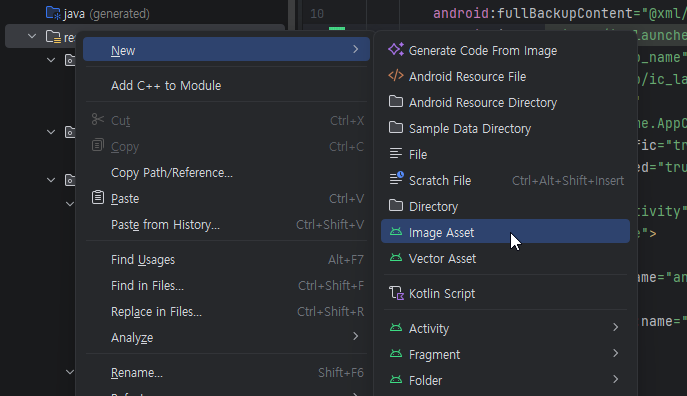
1. 안드로이드 뒤로가기 버튼 사용
2. API 36에서 상단바 숨김현상 처리
3. 아래 스크롤시 새로고침
4. 어플접속확인 agent 추가 - webviewApp/1.0 (Android)
댓글목록
등록된 댓글이 없습니다.

